By Street Address
Knowing your area means knowing where to market your services. Is there a main street in town that gets most of your deliveries? Or maybe it gets very few and you need to increase your presence.
Wouldn't it be nice to be able to see that information? Being able to search your customer list by address allows you to do just that so you can plan accordingly.

Use the buttons along the top of the report to select a date range, email or print the report. Using the 'Labels' function allows you to print out mailing labels to use in addressing correspondence to your customers from this list.
Use the  Button to enter your search criteria EX: addresses containing 'Elm' street.

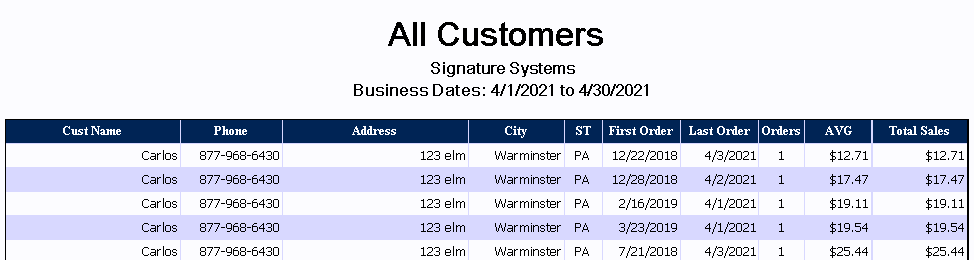
In addition to showing the contact information for the customer the report also contains:
|
First Order |
Date that customer first placed and order. Use this field to determine longevity of the customer contact. |
|
Last Order |
Shows when the last order by the customer was placed. |
|
Orders |
Displays the total number of orders the customer has placed. Along with sales value this is a good way to determine customer satisfaction. The first section shows total orders and the 'current period' section shows orders in the report date range. |
|
AVG |
let's you see the average sale amount for all time and the current report date range. |
|
Total Sales |
Shows total value of sales made by the customer for all time and the report range. |