Daily
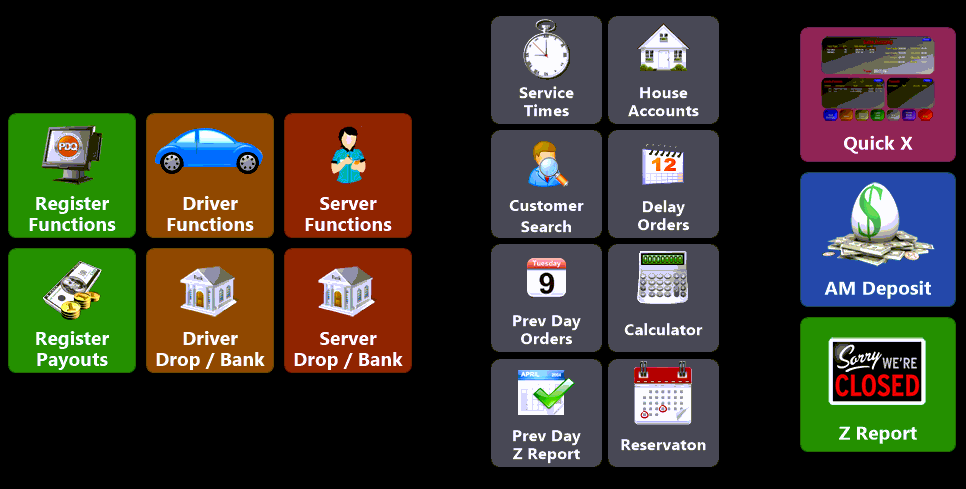
The Daily tab on the PDQPOS manager screen contains all of your day-to-day functions. These allow you to perform most of the tasks needed to keep your point-of-sale terminals running efficiently.
|
Register Functions |
Use this feature to close shifts, Drop cash and adjust register banks |
|
Driver Functions |
Allows you to assign a bank to a driver, drop cash from a driver, as well as view previously settled driver information |
|
Server Functions |
Shows you server information in a handy grid layout |
|
Register Payouts |
Allows you to perform cash Pay Outs for supplies or cash Pay Ins to the the Point-of-Sale |
|
Driver Drop / Bank |
This feature gives you the ability to either start your drivers off with a cash bank so they can make change or collect and bank cash from them as the day progresses |
|
Server Drop / Bank |
Similar to the Driver function of the same name, this feature let's you perform bank and drop functions for Servers |
|
Service Times |
Adjust expected service times throughout the day as business needs dictate |
|
House Accounts |
Use this to View, Print and apply payments to House Accounts |
|
Customer Search |
This function can be used to look up the name and number of any customer you have entered in the system |
|
Delay Orders |
Allows you to view and input any orders that were delayed by the customer for future processing |
|
Prev Day Orders |
This feature gives you the ability to view, print or email previous days orders |
|
Calculator |
Brings up an on-screen calculator so you can count cash quicker |
|
Prev Day Z Report |
View, print or email a previous day's Z report |
|
Reservation |
Allows you to add new, or see existing, reservations |
|
Quick X |
The Quick X feature gives you the ability to run various reports and see a wealth of data at a glance |
|
AM Deposit |
Allows you to segment your day by performing a deposit outside of Zout (Day close) |
|
Z Report |
The Z-Report closes out and finalizes your day allowing you to start a new business day |