Tax Details
This report shows sales detail for the chosen date range. This data is broken out by day to allow the user to compare sales from individual business days.
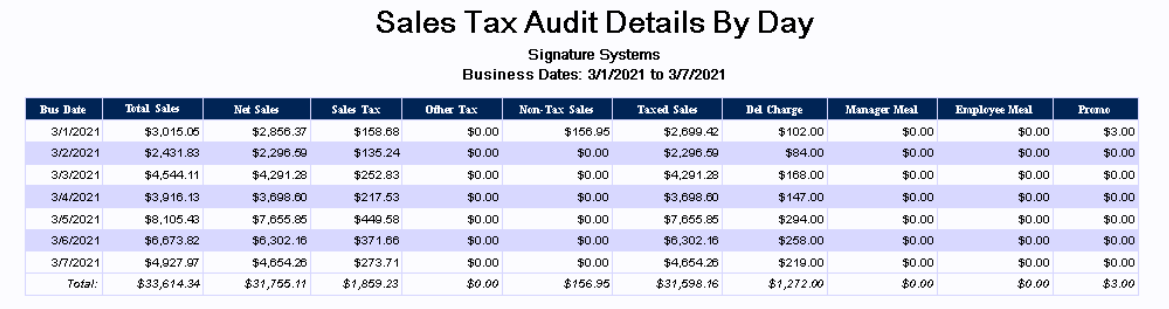
|
Bus Date: |
This column shows the associated business date (this may be different from the actual calendar date depending on when the store performs its Z-Report) |
|
Total Sales: |
This column shows total sales for the day for the associated business date |
|
Net Sales: |
This column shows Net Sales for the associated business date |
|
Sales Tax: |
This column shows the amount of sales tax that was charged to the customer for the associated business day |
|
Other tax: |
Additional tax (if any) charged to the customer for things such as a special 'Public Improvement Fee' |
|
Non-Tax Sales: |
This column shows the amount of non-taxed sales made for the associated business day. You may be required to provide proof of exemption such as a Tax exemption number provided by your state. |
|
Taxed Sales: |
This column shows the amount of non-taxed sales made for the associated business day. |
|
Del Charge: |
This column shows the amount charged to the customers for deliveries made by the store. |
|
Manager Meal: |
This column shows dollar value of any employee meals for the associated business day |
|
Employee Meal: |
This column shows dollar value of any manager meals for the associated business day |
|
Promo: |
This column shows the amount of items given away as a promo for the associated business day |