Tax Exempt Orders
This report can be run for an individual business day or date. It will break out the date range into individual entries to allow comparison of non-taxed sales for the individual days in the range.
Non-Taxed sales are usually associated with non-profit organizations and may require proof of eligibility from your state or other local regulatory entity.
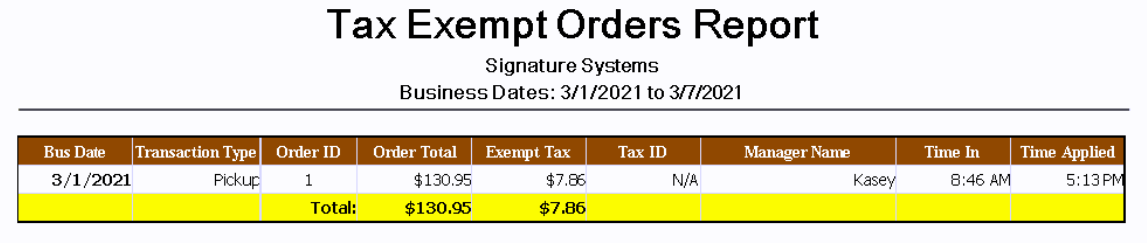
|
Bus Date |
This column shows the associated business date (this may be different from the actual calendar date depending on when the store performs its Z-Report) |
|
Transaction Type |
Shows Transaction Type for the associated order such as Dine in, Pickup, Deliver, Etc. |
|
Order ID |
Shows the Order ID of the associated order, this number may be re-used across the range of the report |
|
Order Total |
Displays the order total that was charged to the customer |
|
Exempt Tax |
let's you see the total of tax the would have been collected on a normal (nonexempt) order |
|
Tax ID |
This Column shows the Tax ID (if any) supplied by the customer and associated with the order |
|
Manager Name |
Shows the name of the manager who approved the sale |
|
Time In |
This column shows the clock in time for the manager who approved the sale |
|
Time Applied |
Displays the time the sale was exempted by the associated manager |
|
Total: |
Shows the total value and tax saved from all tax exempted orders during the report range |