Waste Orders
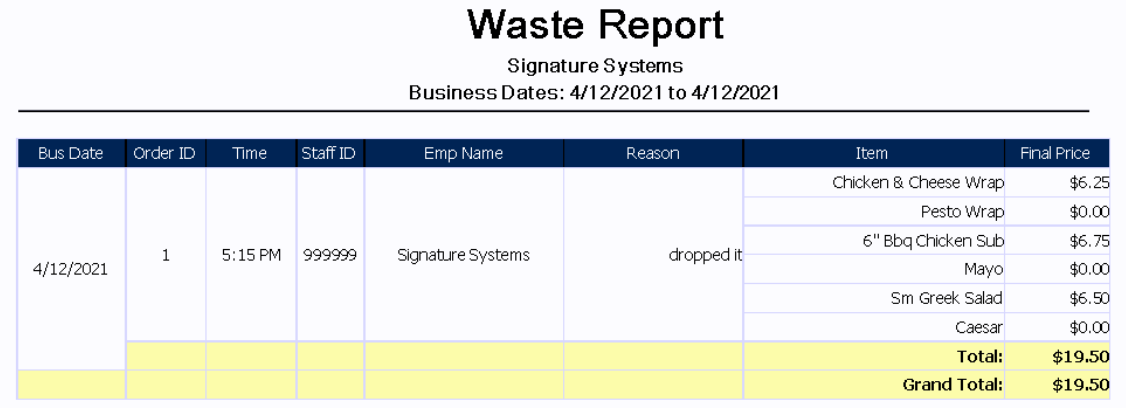
This report shows entire orders that were wasted using the Waste feature on the payment screen. This report may differ from the 'Waste Item' report if individual items are also wasted during the date range the report was run for. Wasting an order will waste all items on that order.
|
Bus Date |
This column shows the associated business date (this may be different from the actual calendar date depending on when the store performs its Z-Report) |
|
Order ID |
Shows the Order ID of the associated order, this number may be re-used across the range of the report |
|
Time |
Displays the time that the order was wasted |
|
Staff ID |
This column shows the employee number of the staff member who entered the waste |
|
Emp Name |
Shows the name of the staff member who entered the waste |
|
Reason |
This is a free text entry that allows the person entering the waste to state the reason why they wasted the order |
|
Item |
Shows the items on the order that were wasted |
|
Final Price |
Displays the value of the item(s) wasted. This reflects the sale price of the item and does not include taxes |
|
Total: |
This row shows the total in value of the wasted items in the associated order |
|
Grand Total: |
Shows the grand total in value of the wasted items for the range of the report |