Previous Days Z Report
Use the Previous Days Z Report screen to view the Z Report for a previously closed business day. Like a normal Z Report, you cannot change any of the information on the report.
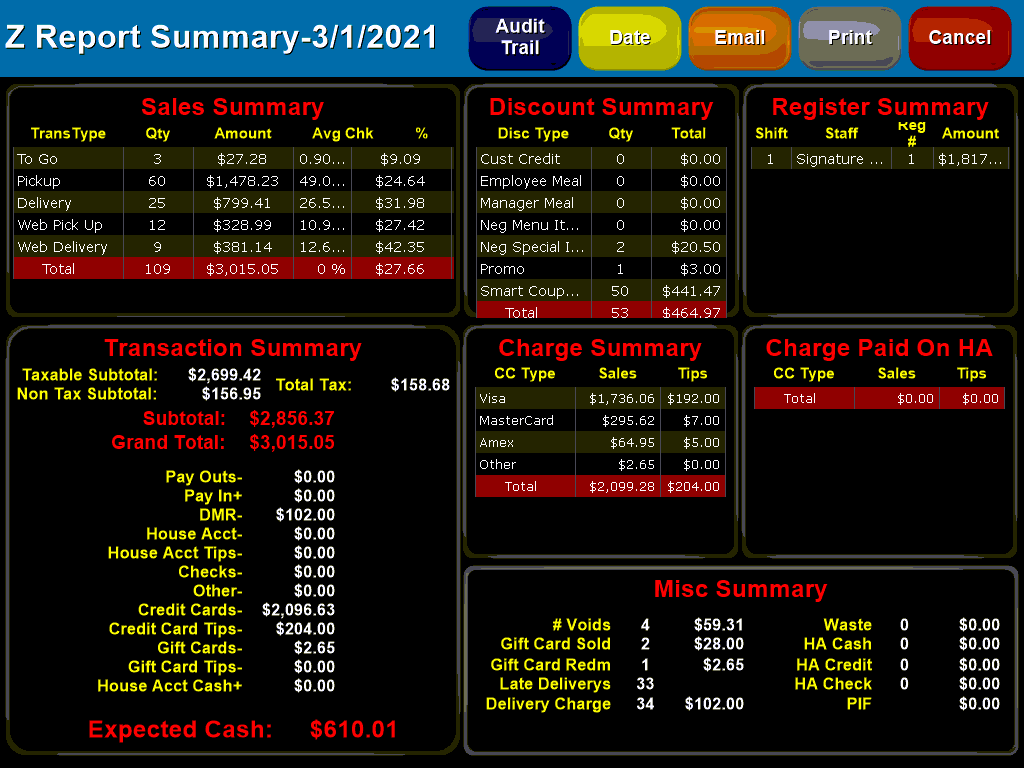
You can use the  button to select a single date to display. This will allow previously closed business dates to be selected, if a date was skipped or combined with another day you cannot select it.
Additionally you can also use the  button to email a copy of the report to an external address or the
  button to print out a copy.
 - is used to bring up a list of all sales for the day:

This screen shows information about the associated orders such as the time the order was taken and delivered as well as if the delivery was listed as being late (in yellow). You can also view such things as the order ID, which register and employee took the order as well as amount and type of payment.
Additional information can be viewed by selecting the order ID from the list to bring up a detailed information screen:

This screen shows you a detailed list of the items as well as how the order was paid. Additionally shows the customer contact information as well as a detailed breakdown of all actions taken on the order. From this screen you can print and email the receipt as well.