Suspend \ Recall Order

Orders can be started and suspended for later recall. To suspend an order use the button located at the top of the screen. This will save the order for later recall allowing you to ring up other customers in the meantime.
To recall an order that was suspended or from a previous sale use the  button and choose the order from the list:

The recall order list can be filtered using the buttons along the bottom to show orders with different statuses: All orders, Voided, Paid or open orders.
You can also bring up orders from previous business dates by choosing the  button and selecting the required date.
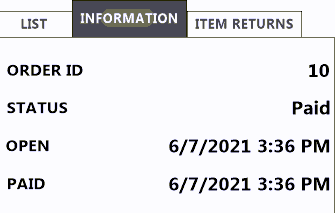
Switching from the List to Information tab will show you information about the selected order's status. Use the Item Returns tab to return any items from the order depending on your store's policy.
You can re-open an order that has been paid by selecting the  button in the bottom left of the screen. This will bring you back to the order screen where you can either delete items or reduce their quantity. This will take the items off the order and refund them to the customer.
Once you have finished removing items from the order you can select the  button and choose the appropriate 'payment' option to refund the customer.
You can also use the  button to refund and void out an entire order.
Select the Void Order button and enter the reason for the void:
