Tax Rate
Make sure you pay the correct amount in taxes, not too much but not too little by setting and maintaining your stores tax rates.
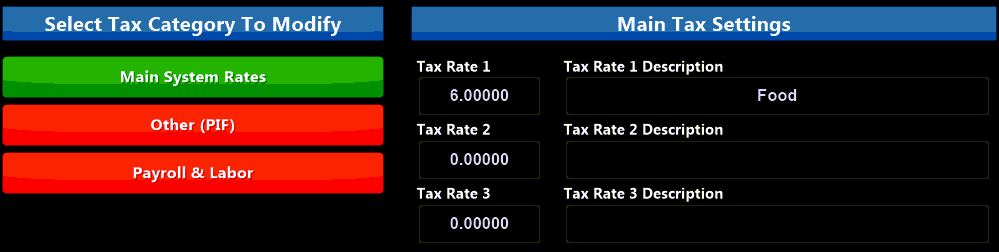
Main System Rates: there are three (3) tax rated you can configure. Enter the tax rate and give it a 'friendly name' that can easily be remembered for reporting and menu item creation.
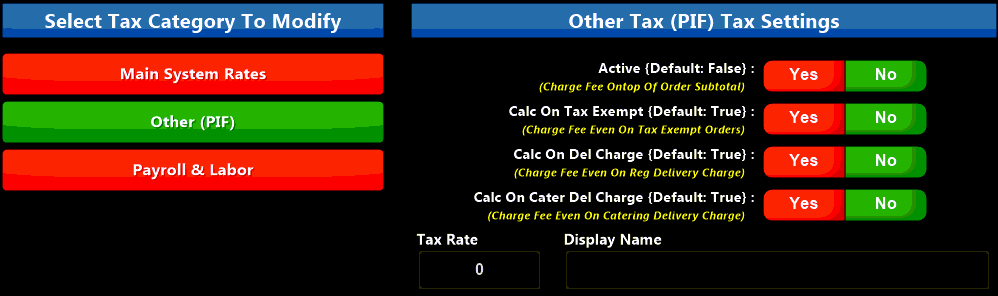
Other (PIF): used to set the PIF (Public Improvement Fee) rate and associated options. Enter the Tax Rate and a 'friendly name'.
Toggle the options Yes or No depending on your local PIF configuration. If your area does not use a PIF tax this can be used to calculate any additional taxes that may need to be collected.
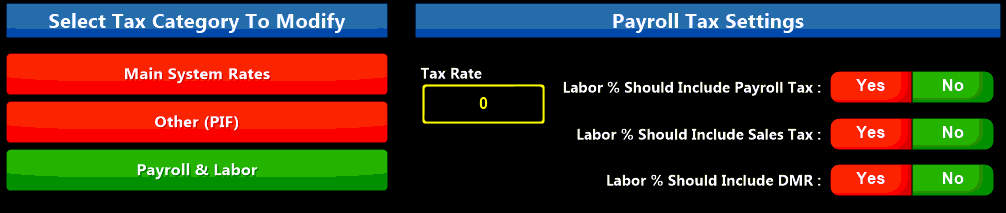
Payroll & Labor: set any payroll tax rate and choose if the labor percentage shown on reports should include the payroll tax, sales tax and Driver Mileage Reimbursement (DMR). These options are defaulted to NO (not included), toggle them to YES if desired.