Void-Promo
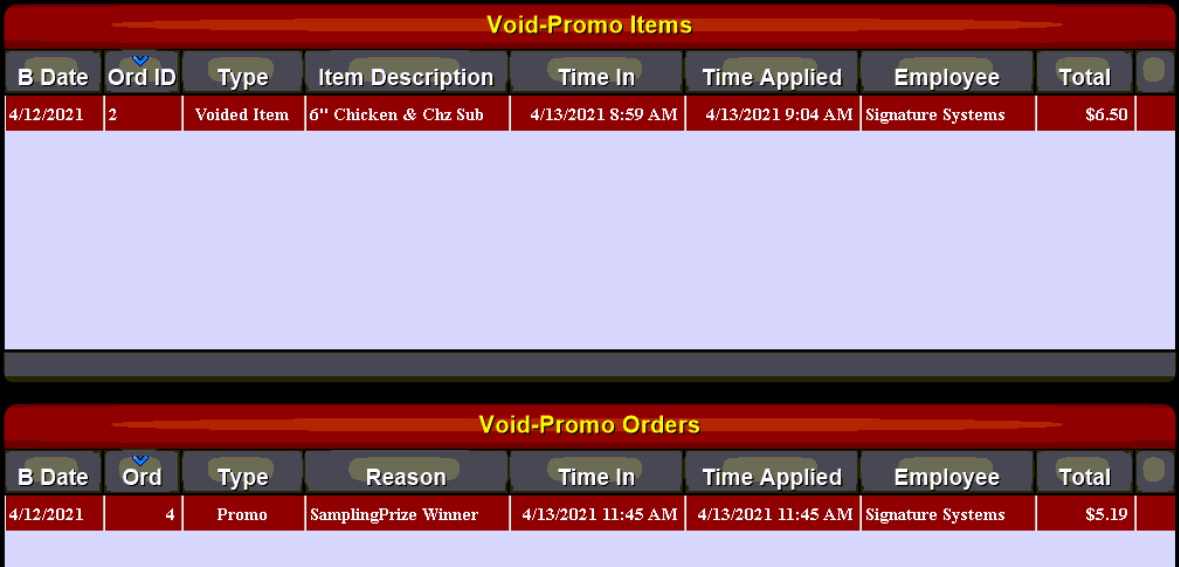
This report shows Voided and promoed items and orders for a selected date range.
The Void-Promo Report is useful to track Removal of Tickets and Items after they have been added in the system. There are two sections to this report:
- Void-Promo Items
- Void-Promo Tickets
Both sections show similar but distinct information.
|
B Date |
Shows the associated business date (this may be different from the actual calendar date depending on when the store performs its Z-Report) |
|
Ord ID |
This column displays the individual order ID numbers of the referenced orders |
|
Type |
This column shows associated void\promo types |
|
Item Description |
This column is available in the Item section only and shows the menu item name |
|
Reason |
This column is available in the Orders section only and shows the entered reason for the promo of the order |
|
Time In |
This column shows the time that the order was entered into the system |
|
Time Applied |
This column displays the date and time that the void or promo was applied |
|
Employee |
let's you see the name of the employee who applied the promo or voided the order |
|
Total |
Shows two different values dependent on which section is being viewed:
|