Delivery Order Audit
The Delivery Orders Audit report shows a list of orders for the associated date range that were sent as the delivery Transaction Type.
 This report will not reflect deliveries performed by third-party services such as GrubHub or DoorDash. To see third party deliveries please see the "Third Party Orders" report.
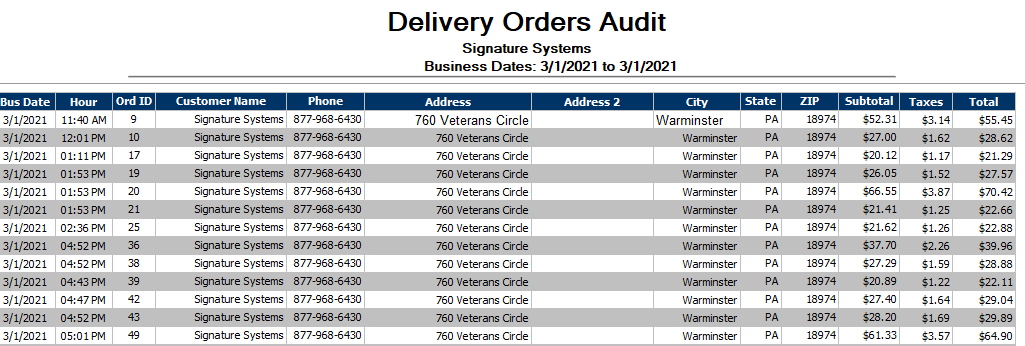
|
Bus Date |
This column shows the associated business date (this may be different from the actual calendar date depending on when the store performs its Z-Report) |
|
Hour |
Shows the time that the associated order was marked as having left the store on a delivery to be taken to the customer's location |
|
Ord ID |
Displays the shows the individual order ID numbers of the referenced orders |
|
Customer Name |
Shows the shows the Customer's name. This may be an individual or corporate account name depending on how the customer was initially added to the system |
|
Phone |
This column shows the associated phone number (if any) for the customer |
|
Address |
This column shows the associated address (if any) for the customer |
|
Address 2 |
Displays the shows any additional address information (if any) for the customer |
|
City |
This column shows the city that the order was delivered to |
|
Sate |
Shows the shows the State that the order was delivered to |
|
Zip |
This column shows the Zip Code that the order was delivered to |
|
Subtotal |
This column shows the Pre-Tax total of the order |
|
Taxes |
Displays the shows the total taxes applied to the order |
|
Total |
Shows the shows the total of the order (subtotal + taxes) |