Royalties Discount
The Royalties Discount report shows all discounts given within a given time period. This report is broken out into several discrete sections.
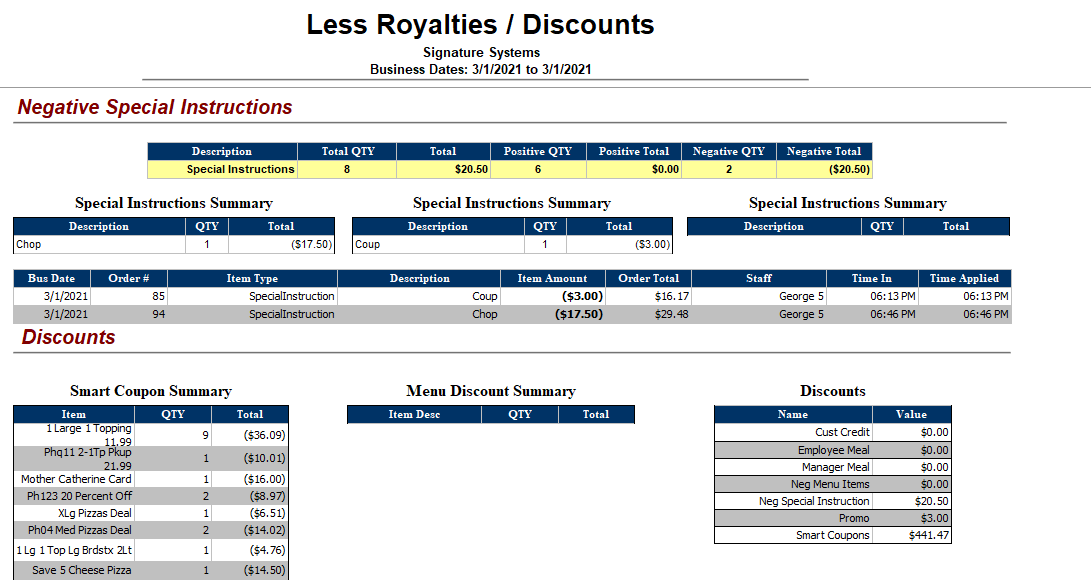
Negative Special Instructions:
|
Description |
Shows the name of the special instruction applied |
|
Total QTY |
Displays the total quantity of special instructions both positive and negative in value |
|
Total |
This column shows the total value of all special instructions both positive and negative |
|
Positive QTY |
Displays the total quantity of all positive special instructions |
|
Positive Total |
This column shows the total value of all positive special instructions |
|
Negative QTY |
Shows the total quantity of all negative special instructions |
|
Negative Total |
This column shows the total value of all negative special instructions |
Special Instructions Summary:
|
Description |
This column shows the name of the special instruction |
|
QTY |
Shows the quantity of the special instruction |
|
Total |
Displays the total value of the special instruction |
Special Instructions Detail:
|
Bus Date |
This column shows the associated business date (this may be different from the actual calendar date depending on when the store performs its Z-Report) |
|
Order # |
Displays the Order ID of the associated order, this number may be re-used across the range of the report |
|
Item Type |
Shows the item type of the discount applied |
|
Description |
This column shows the menu item description of the discount applied |
|
Item Amount |
Shows the discount amount. Note that this is usually a negative number |
|
Order Total |
This column shows the total amount of the order after the discount was applied |
|
Staff |
Displays the name of the employee who applied the discount to the order |
|
Time In |
This column shows the time the order was placed |
|
Time Applied |
Displays the time the discount was applied |
Smart Coupon\Menu Summary:
|
Item |
This column shows either the coupon applied or the menu item that contained a discount |
|
QTY |
Shows the quantity of the coupon applied or menu item ordered |
|
Total |
This column shows the total value of the discount applied |
Discounts Summary:
|
Name |
Displays the name of the discount family applied |
|
Value |
This column shows the value of the discount family applied |
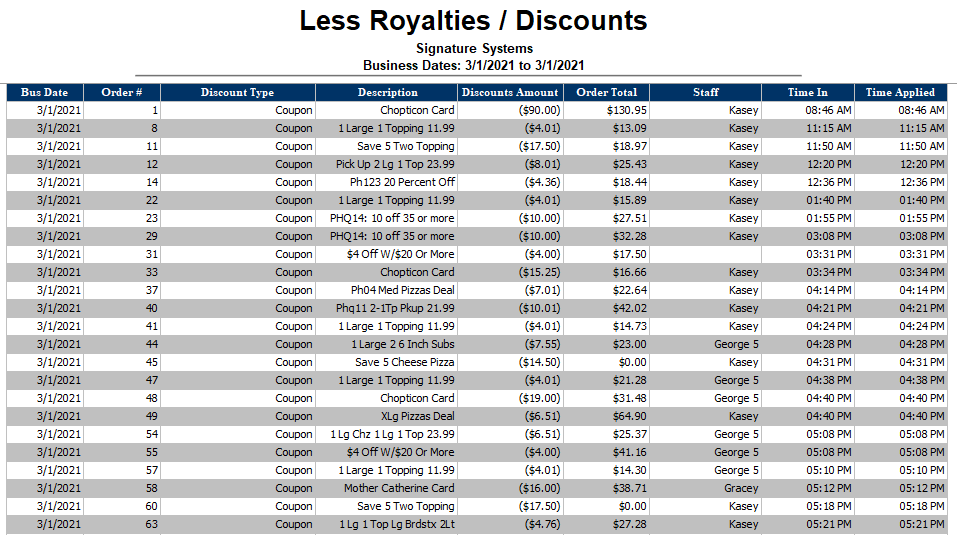
Smart Coupon Detail:
|
Bus Date |
This column shows the associated business date (this may be different from the actual calendar date depending on when the store performs its Z-Report) |
|
Order # |
Shows the Order ID of the associated order, this number may be reused across the range of the report |
|
Discount Type |
This column shows the item type of the discount applied |
|
Description |
Displays the menu item description of the discount applied |
|
Discounts Amount |
This column shows the discount amount. Note that this is usually a negative number |
|
Order Total |
Displays the total amount of the order after the discount was applied |
|
Staff |
This column shows the name of the employee who applied the discount to the order |
|
Time In |
Shows the time the order was placed |
|
Time Applied |
Displays the time the discount was applied |
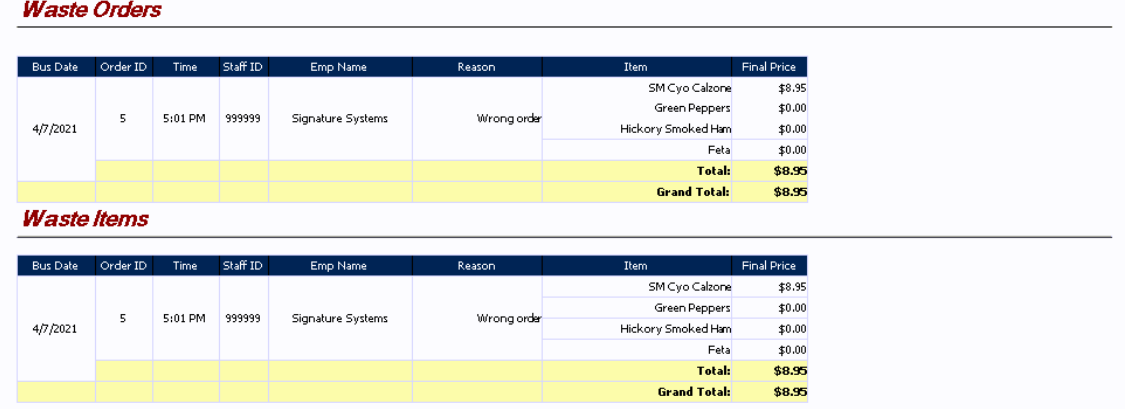
Waste Orders\Items:
|
Bus Date |
This column shows the associated business date (this may be different from the actual calendar date depending on when the store performs its Z-Report) |
|
Order ID |
Displays the Order ID of the associated order, this number may be re-used across the range of the report |
|
Time |
This column shows the time that the order was wasted |
|
Staff ID |
Shows the employee number of the staff member who entered the waste |
|
Emp Name |
This column shows the name of the staff member who entered the waste |
|
Reason |
This is a free text entry that allows the person entering the waste to state the reason why they wasted the order |
|
Item |
Shows the items on the order that were wasted |
|
Final Price |
Displays the value of the item(s) wasted. This reflects the sale price of the item and does not include taxes |
|
Total: |
Shows the total value of the waste items\orders |
|
Grand Total |
Shows the grand total of all wasted items or orders referenced |
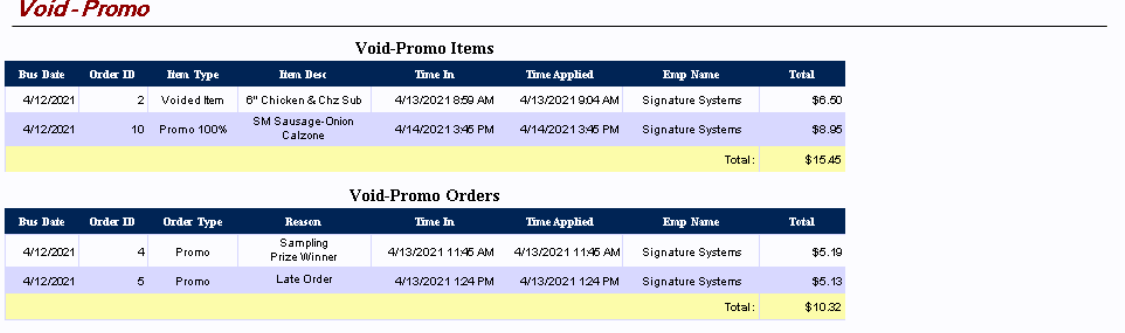
Void-Promo Items\Orders:
|
Bus Date |
This column shows the associated business date (this may be different from the actual calendar date depending on when the store performs its Z-Report) |
|
Order ID |
This column shows the individual order ID numbers of the referenced orders |
|
Item Type |
Shows the associated void\promo types |
|
Item Desc |
This column is available in the Item section only and shows the menu item name |
|
Reason |
This column is available in the Orders section only and shows the entered reason for the promo of the order |
|
Time In |
Displays the time that the order was entered into the system |
|
Time Applied |
This column shows the date and time that the void or promo was applied |
|
Emp Name |
Displays the name of the employee who applied the promo or voided the order |
|
Total |
Shows two different values dependent on which section is being viewed:
|
|
Total: |
Shows the total value of the voided\promo items and orders |