Special Instruction
The Special Instructions Summary report shows all special instructions used within a given time period as well as their impact on sales totals. This report is broken out into several discrete sections.
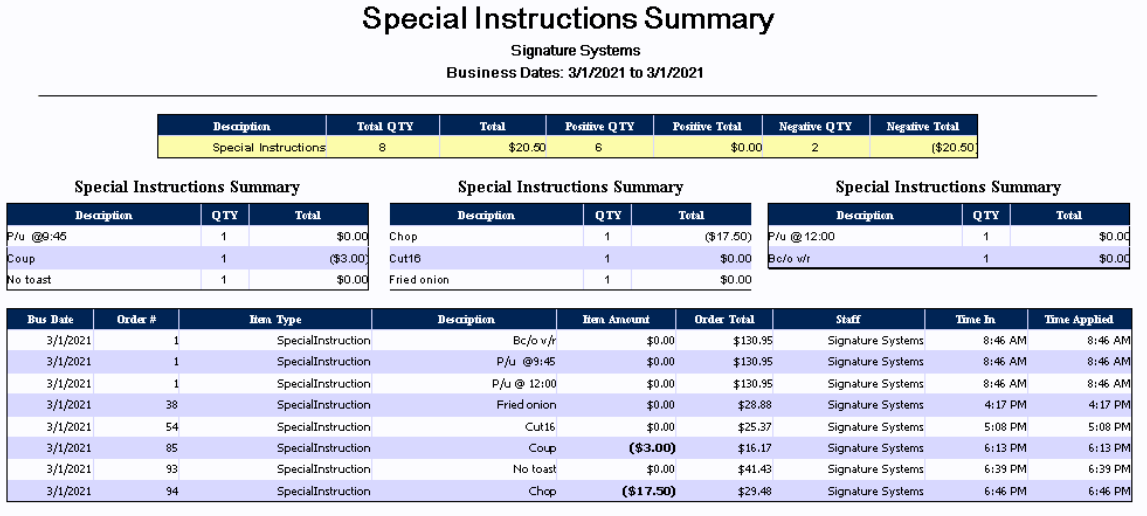
Special Instructions:
|
Description |
This column shows the name of the special instruction applied |
|
Total QTY |
Shows the total quantity of special instructions both positive and negative in value |
|
Total |
This column shows the total value of all special instructions both positive and negative |
|
Positive QTY |
Displays the total quantity of all positive special instructions |
|
Positive Total |
Shows the total value of all positive special instructions |
|
Negative QTY |
This column shows the total quantity of all negative special instructions |
|
Negative Total |
Displays the total value of all negative special instructions |
Special Instructions Summary:
|
Description |
shows the name of the special instruction |
|
QTY |
This column shows the quantity of the special instruction |
|
Total |
Displays the total value of the special instruction |
Special Instructions Detail:
|
Bus Date |
Displays the associated business date (this may be different from the actual calendar date depending on when the store performs its Z-Report) |
|
Order # |
This column shows the Order ID of the associated order, this number may be re-used across the range of the report |
|
Item Type |
Shows the item type of the discount applied |
|
Description |
Displays the menu item description of the discount applied |
|
Item Amount |
This column shows the discount amount. Note that this is usually a negative number |
|
Order Total |
Shows the total amount of the order after the discount was applied |
|
Staff |
This column shows the name of the employee who applied the discount to the order |
|
Time In |
This column shows the time the order was placed |
|
Time Applied |
Displays the time the discount was applied |