Trans Type by Day
The 'Trans Type by Day' report shows detailed sales and Transaction Type data as a percentage of net sales for the range.
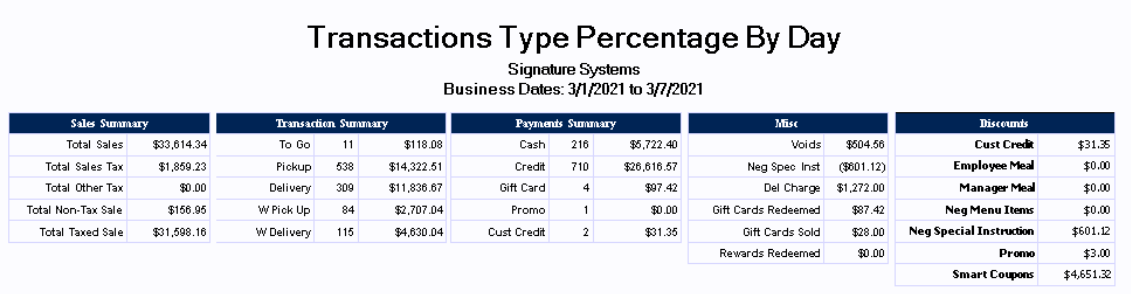
Sales Summary:
|
Total Sales |
This row shows total sales for the day for the associated business date |
|
Total Sales Tax |
This row shows the amount of sales tax that was charged for the associated business day |
|
Total Other Tax |
Shows any additional tax (if any) charged to the customer for things such as a special 'Public Improvement Fee' |
|
Total Non-Tax Sale |
This row shows the amount of non-taxed sales made for the associated business day. You may be required to provide proof of exemption such as a Tax exemption number provided by your state. |
|
Total Taxed Sale |
Displays the amount of non-taxed sales made for the associated business day. |
Transaction Summary:
|
To Go |
Displays the total number and numerical value of all orders with the 'To Go' Transaction Type |
|
Pickup |
Shows the total number and numerical value of all orders with the 'Pickup' Transaction Type |
|
Delivery |
This row shows the total number and numerical value of all orders with the 'Delivery' Transaction Type |
|
W Pick Up |
This row shows the total number and numerical value of all orders with the 'W Pick Up' Transaction Type (Web Pick up) |
|
W Deliver |
Shows the total number and numerical value of all orders with the 'W Delivery' Transaction Type (Web Delivery) |
Payments Summary:
|
Cash |
This row shows the total number and numerical value of all orders that were tendered as 'Cash' |
|
Credit |
Shows the total number and numerical value of all orders that were tendered as 'Credit' |
|
Gift Card |
This row shows the total number and numerical value of all orders that were tendered as 'Gift Card' |
|
Promo |
Displays the total number and numerical value of all orders that were tendered as 'Promo' |
|
Cust Credit |
Shows the total number and numerical value of all orders that were tendered as 'Customer Credit' |
Misc:
|
Voids |
This row shows the total numerical value of all orders that were voided during the date range (this total includes only voided orders, not individually voided items) |
|
Neg Spec Inst |
Shows the total numerical value of all special instructions that subtracted from the sales price during the date range |
|
Del Charge |
Displays the total numerical value of all Delivery Charges that were charged to the customer during the date range |
|
Gift Cards Redeemed |
This row shows the total numerical value of all Gift Cards redeemed during the date range |
|
Gift Cards Sold |
Shows the total numerical value of all Gift Cards sold during the date range |
|
Rewards Redeemed |
Shows the total numerical value of all Rewards redeemed during the date range |
Discounts:
|
Cust Credit |
Displays numerical value of any credits issued to customers for the associated business days |
|
Employee Meal |
This row shows numerical value of any employee meals for the associated business days |
|
Manager Meal |
Displays numerical value of any manager meals for the associated business days |
|
Neg Menu Items |
Shows numerical value of any Menu items sold with a negative value for the associated business days |
|
Neg Special Instruction |
This row shows the total numerical value of all special instructions that subtracted from the sales price during the date range |
|
Promo |
Displays the total numerical value of all items that were promoed during the date range |
|
Smart Coupons |
Shows the total numerical value of Smart Coupons redeemed during the date range |
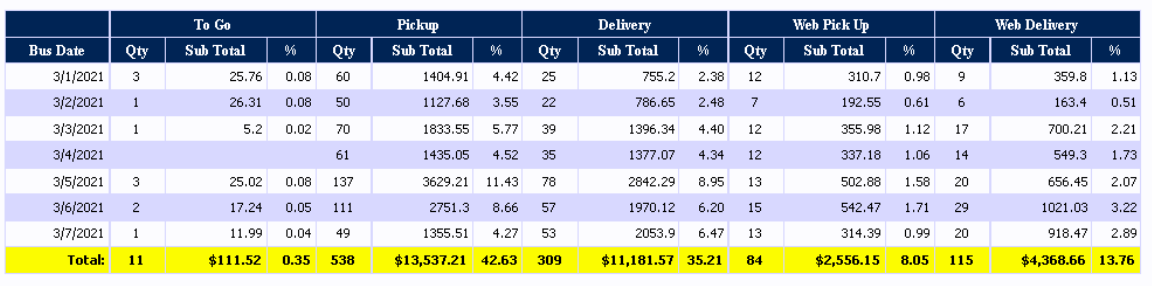
Order Transaction Types:
|
Bus Date |
Displays the associated business date (this may be different from the actual calendar date depending on when the store performs its Z-Report) |
|
Qty |
This column shows the total count for the associated order Transaction Type |
|
Sub Total |
Shows the total numerical value for the associated order Transaction Type |
|
% |
Displays the associated order Transaction Type as a percentage of total sales for the date range |
|
Total |
Shows the total numerical value for the associated columns |
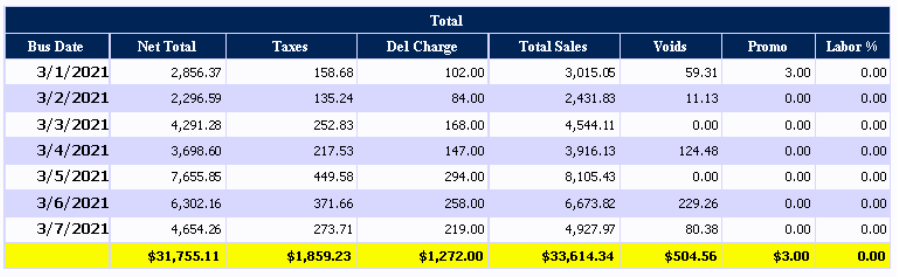
Total:
|
Bus Date |
This column shows the associated business date (this may be different from the actual calendar date depending on when the store performs its Z-Report) |
|
Net Total |
Displays Net Sales for the associated business date (Total Sales - Sales Tax) |
|
Taxes |
This column shows the amount of sales tax that was charged to the customer for the associated business day |
|
Del Charge |
This column shows the amount charged to the customers for deliveries made by the store. |
|
Total Sales |
Displays total sales for the day for the associated business date |
|
Voids |
This row Displays the total numerical value of all orders that were voided during the date range (this total includes only voided orders, not individually voided items) |
|
Promo |
Shows the total numerical value of all items that were promoed during the date range |
|
Labor % |
Displays the labor cost as a percent of sales for the date range |
|
Total |
This row shows the total numerical value for the associated columns |